Three models, and one thing worth understanding before choosing between them: why the picture is played uncompressed, and what that costs.
Compressed video has to be decoded before it can be shown, and what the decode costs depends on the picture — a busy frame is more work than a still one. The load moves with the content, which means a machine that copes with an average frame can still miss the hardest one, on the one evening it matters. Uncompressed removes the step. Every frame costs the same to play, and that cost is known before the show is built rather than discovered during it. It also keeps the gradients intact: at 4:4:4 and 12 bits per channel there is no chroma thrown away and no banding to find later on a screen the audience is sitting close to.
What it costs is arithmetic. A pixel at 4:4:4 and 12 bits per channel is 36 bits. A 4K frame is 8.3 million pixels, so it arrives at roughly 37 MB, and at 60 fps a single stream is about 2.2 GB/s. An 8K frame is four times the pixels and about 9 GB/s at the same settings. That is what the storage has to deliver, continuously, for as long as the venue is open.
Three settings move that figure, and they do not all move it the same way. Bit depth — 8 bits per channel instead of 12 is a third less data. Subsampling — 4:2:2 carries color at half the horizontal detail of 4:4:4, taking off another third. Both of those make the picture itself smaller, so everything downstream gets easier. Compression is the one that behaves differently: NotchLC cuts storage size and storage bandwidth to a quarter, but the frames still have to be decoded before they can be composed, so the processing side works at the uncompressed figure regardless. It buys drives, not headroom.
Which is why a specification separates two kinds of bandwidth. Storage bandwidth is what the drives must sustain for the video layers a show plays — the figure above, and the one compression reduces. Internal bandwidth is what the machine itself has to carry, and it is the higher of the two whenever anything runs alongside the video: capture inputs, network sources, or compressed media being decoded on the way through. It is what the server is sized around.
Output count answers a different question again: what leaves the machine, each output carrying whatever part of the composed picture is routed to it.
The three models
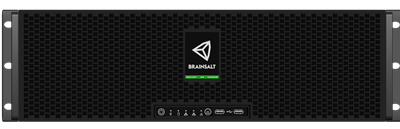
Pro — the model that reaches sixteen outputs, and the widest bandwidth of the three. Genlock, swappable drives in a front cage, and room for add-on cards.
Entry — four outputs at 4K or eight at 2K, and a lower bandwidth ceiling. Same rack format as Pro and up to four add-on cards, without genlock.
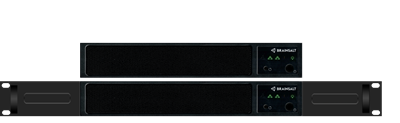
Compact — 1U, four outputs and a lower bandwidth ceiling. No add-on card slots, and the operating system shares the media drive.
|
Pro |
Entry |
Compact |
| 8K outputs |
4 (B9) |
— |
— |
| 4K outputs |
4 or 8 (B8), up to 16 (B9) |
4 |
4 |
| 2K outputs |
4 or 8 (B8), up to 16 (B9), or up to 64 through external quadrant splitters |
4, or 8 (B9), or 16 through external quadrant splitters |
4, or 16 through external quadrant splitters |
| Bandwidth |
up to 17 GB/s (B8), up to 30 GB/s (B9) |
up to 4 GB/s |
up to 3 GB/s (B8), up to 6 GB/s (B9) |
| Storage |
Swappable enterprise SSDs in a front cage |
Enterprise SSDs |
Enterprise SSD |
| Operating system drive |
Dedicated |
Dedicated |
Shared with the media drive |
| Add-on cards |
Up to 4, or 2 |
Up to 4 |
None. Audio options are Analog 8 Audio External USB, ADAT Audio External USB and a Dante Virtual Audio license |
| Support |
Premium |
Standard |
Standard |
Two figures in the table are worth reading carefully. The output counts are connectors, not a promise about what plays through them: chroma subsampling and bit depth decide the bandwidth each stream costs, so the same number of 8K streams can sit well inside one server in 4:2:2 and exceed it in 4:4:4 at 12 bit. And on the 2K row, external quadrant splitters divide a 4K output into four at 2K, which every model can use: a Pro with sixteen 4K outputs reaches 64 screens, and Entry or Compact reach 16 from their four. Backstage addresses each of those quarters as an output in its own right, with its own routing, warp and blend.
Choosing one
Give the configurator the bandwidth and the outputs a job needs and it returns the models that meet them, with every option each can carry. It also asks what the show will play, because a server sized for uncompressed media and one sized for NotchLC are not the same machine: NotchLC needs a quarter of the storage and a quarter of the storage bandwidth, while asking the same of the processing. The configurator works both figures out from the streams a show actually plays.
Server Configurator
The software
Backstage, Brainsalt Hub and Conductor Full arrive with every server, and Backstage includes Calibrator Lite: camera-based alignment from a single camera position, for flat and curved screens. Calibrator itself — several cameras and any screen shape, including domes and spheres — is an add-on licensed per projector, and black level compensation is a separate add-on again.
Software
