Camera Based Auto Alignment of Warping and Blending of Multi-Channel Projections
In a projection with several projectors, adjusting warping and blending by hand to a seamless image is very hard — and on a dome, a sphere or anything blended on more than two sides it is close to impractical. The alignment then has to be held during operation, which by hand means keeping a well-trained technician within reach of the building for the life of the installation. Special cases ask for more again: a dome needs content mapping and parameters such as the seated viewer position, which change how the picture is warped onto the surface. Across a cluster of servers, high-resolution content may also need slicing into a piece for each projector.
Warping, Blending, Masking, Slicing - Pixel Perfect
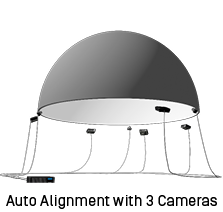
The Calibrator software takes care of all these tasks. The only additional hardware you need to install is a number of digital photo cameras that are able to “see” the entire screen surface. They can be located anywhere, either on top of the screen or integrated. There are no restrictions or limitations. For a typical dome shape screen you will need 3 cameras.
Blacklevel Compensation
Calibrator and Backstage are capable to compensate the different black levels that appear on the screen, caused by the remaining light output of projectors when they project black, especially noticeable in overlapping areas. The correction is camera based and can work with mixed digital & mechanical blending.
Mechanical & Digital Blending Combined
With Calibrator and Backstage, a mixed mechanical and digital blending can be created, reducing the complexity of the mechanical masks with an outstanding black and white level on screen.
Planar, Curved, Spherical, Dome, or 3D Model - Any Screen Shape
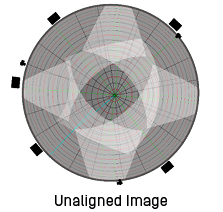
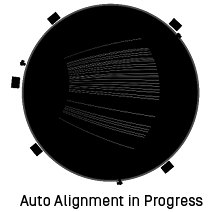
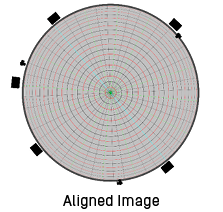
The projection system must be constructed in the software first. The 3D Model includes the screen (can be of any shape), projectors and cameras. If everything would have been built and placed in real as planned, you would have an aligned picture already after this construction phase – but this is theory. In fact, all buildings have tolerances and that’s where the camera based auto alignment starts its work: several test images are projected on each projector and the cameras take pictures of them. Our software analyses the offset and wrong warping of the projected images and perfectly adjusts warping and blending to have a seamless image on the screen shape.
Perfect Image by Pressing a Button
A projected image does not stay where it was put. The building moves with temperature, the screen structure moves with it, and so do the projectors — their optics and mechanics warm through a show and cool down again overnight. In a dome the result is visible: pixels that met exactly at commissioning no longer quite meet. Recalibration is a button, so where the quality bar is high it can be part of opening, every day, and the image stays aligned for the whole life of the installation.